Caption styles and video looks for your reels.
A style is the look of a video: color grade, captions, titles, motion and sound. Pick one from tiles, or paste a reel you like and Chockstone reads its look.
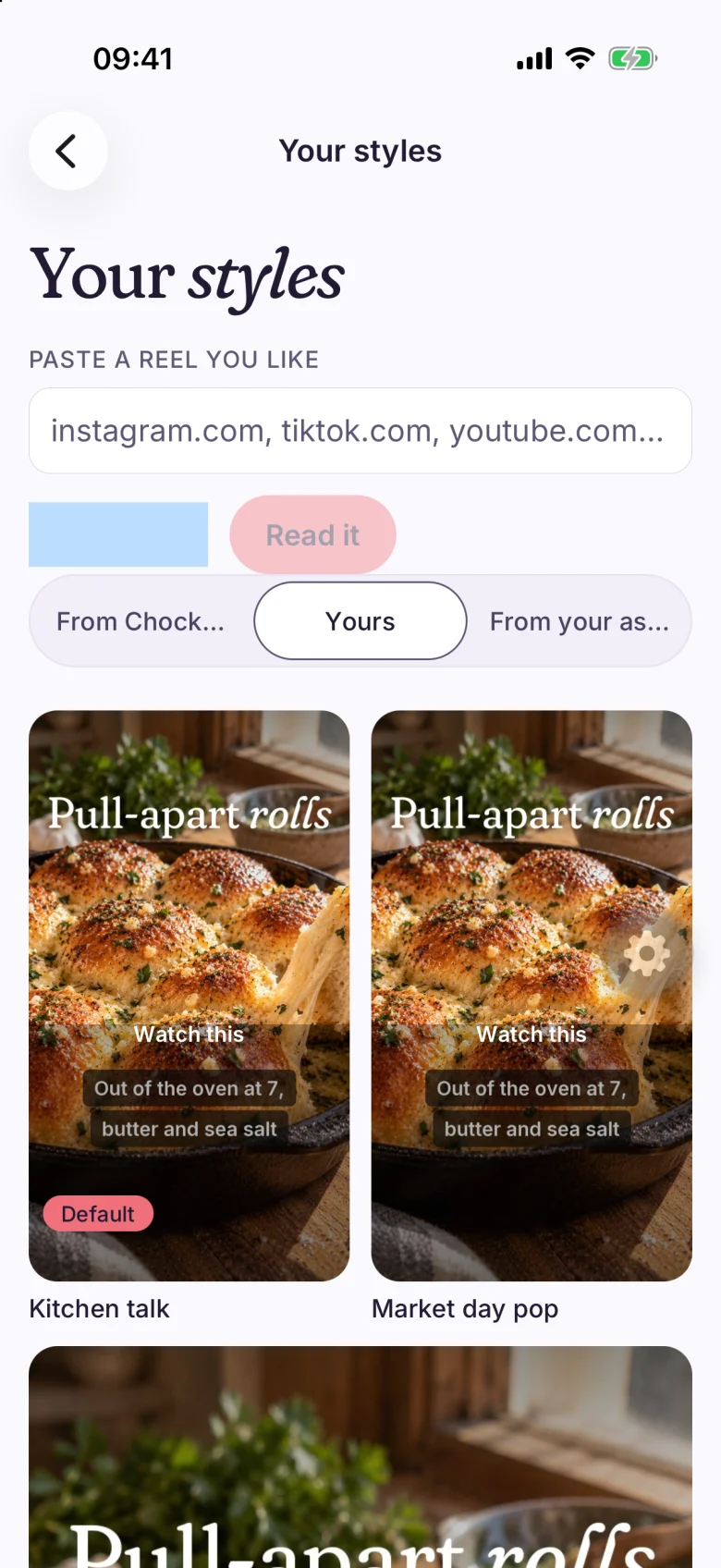
Five parts, saved together.
A style stores the color grade (brightness, contrast, color strength and warmth), the caption style and its motion, the title style and its animations, camera moves and cuts, and sound effects and music.
Make it your default and every new video starts with it. Your styles has three tabs: From Chockstone, Yours and From your assistant.
- Color grade
- Captions
- Titles
- Motion
- Sound
See the style on a clip, not a name.
Styles appear as tiles drawn on a real clip, so you choose by what the captions look like. Text color, highlight color and caption motion sit one tap in, and the tile marked Default is the one new videos use.
- Word pop
- Karaoke
- Word bounce
- Slide up
Give it a link, get a style.
Paste an Instagram, TikTok, YouTube or Threads link into Paste a reel you like and press Read it. When it finishes you can Keep it, and it goes into Yours, or press Make one like it to start a video with that look.
Chockstone reads the look and the pacing, such as grade, caption style, motion and cuts, and records the link as the source. If it cannot read a link you get Couldn't read that one. Share it from Instagram instead.
The brand kit re-skins a style.
Styles point at your brand colors and fonts rather than fixed values. Change the brand in You and the styles that use it follow.
A style an assistant adds over MCP lands under From your assistant with Keep or Remove, and changes none of your videos until you use it.
- Brand colors
- Brand fonts
- Logo
Read the dated comparisons.
- CaptionsStyles here come from tiles, from a pasted reel, or from your brand. Read Chockstone and Captions
- OpusClipA style is saved once and applied to every new video you make. Read Chockstone and OpusClip
- CardboardYou can build a style from a reel you like. Read Chockstone and Cardboard
Questions people ask.
What does a style change?
The color grade, the caption style and motion, the title style and animations, camera moves and cuts, and sound effects and music.
What happens when I paste a reel?
Chockstone reads the reel's look and pacing and makes a style from it. Keep it saves the style to Yours, and Make one like it starts a video with that look. The link is recorded as the source.
Will a style use my brand?
Yes. Styles use your brand colors and fonts, so a change to the brand in You carries into them.
The facts, in one place.
- Does
- Saves a video look (color grade, captions, titles, motion and sound) that you pick from tiles or read from a reel you paste.
- Plans
- Included on every plan: Starter, Creator and Studio.
- Limits
- Brands: Starter 1, Creator 5, Studio 25. Connected accounts: Starter 3, Creator 15, Studio 75.
Make your first video today.
Free for 3 accounts. No card. Back to the home page or see every plan limit.